
Quote Me
Quote Me keeps the business side of a trade in one place on your iPhone or iPad: who you are, what you charge, where you need to be, and every job from the first call to being paid. In the App Store it is listed as Tameside Quote Me; the app itself just calls itself Quote Me.
Your business profile holds the business and trading names, a logo taken with the camera or chosen from your photos, contact details and address, VAT and registration numbers, currency, payment terms, how long a quote stands, a footer and, if you want them, bank details. A preview shows exactly how the head of your quotes will look.
The calendar puts site visits, quote meetings and follow-ups on a month view, with the selected day listed underneath. Each appointment has its customer, address, start and end, a colour, notes with sketches and handwriting, and a reminder if you want one. The planner lays the working week out as a grid, Monday to Friday, with the weekend shown when something is on it; jobs and work blocks are placed by their times on one scale, so the week reads at a glance. Hold a job to copy it and tap to paste it into another slot.
The compass gives a bearing, latitude and longitude, the OS grid reference with eastings and northings, the nearest postcode when you ask for it, altitude, accuracy, speed, sunrise, sunset and the light left — and can copy the location into a message or start an appointment at that site with the address already filled in. Services is your price list: a call-out, an hour’s labour, a fitted radiator, each with its price before VAT and its VAT rate, kept to the penny.
Everything stays on your device, with the records in a database encrypted at rest. There is no advertising or analytics code in the app, and a PIN can be set to keep it locked.
- PlatformiPhone and iPad, iOS 15 and later
- Version1.0.0
- StorageOn device only, encrypted at rest, PIN protected
- ScreensProfile, calendar, planner, compass, services, job tracker, notes, evidence, settings
- RemindersOn any appointment, job or note, all listed in Settings
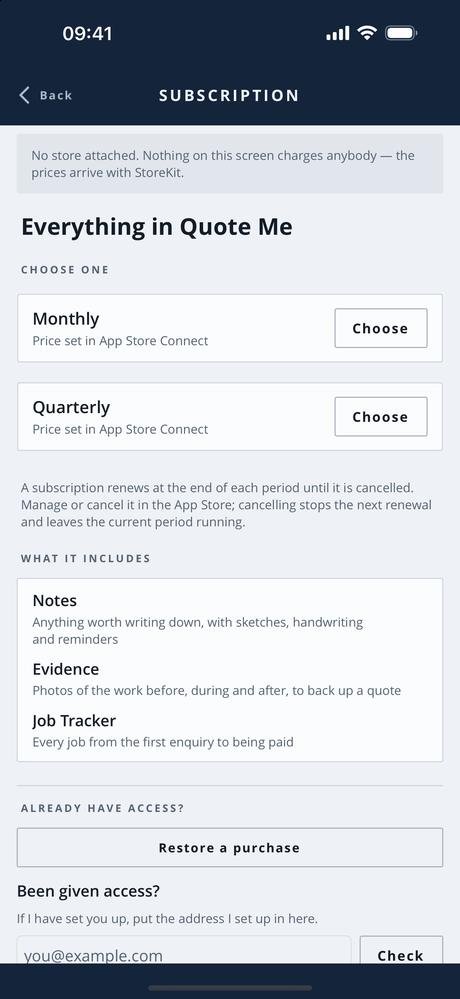
Free, and what a subscription unlocks
The business profile, the calendar, the planner, the compass and your list of services are free, and so are the reminders that go with them.
A Quote Me Full Access subscription unlocks the three screens that keep the record of the work: the job tracker, which follows every job from the first enquiry through quoted, booked, in progress, completed and invoiced to paid — or lost; notes, with sketches, handwriting, reminders, pinning and search; and evidence, photographs of the work before, during and after, filed by stage with a caption, to back up a quote or settle a dispute. It comes in two lengths, monthly and quarterly, and renews until you cancel it.
- Monthly See the App Store renews every month
- Quarterly See the App Store renews every three months
Prices are not listed here, because they can change. Check the App Store for the up-to-date price, in your own currency, before you subscribe — it is the App Store that takes the payment. Most of the apps give new subscribers an introductory offer: an introductory period at the start, before the first payment is taken. How long it lasts can change, so again, check the App Store for the details. A subscription renews at the end of each period unless it is cancelled at least 24 hours before that period ends — from the Manage subscription button in the app, or in your App Store account settings.
Cancelling takes nothing off your phone. Your jobs, notes and photographs stay exactly where they are; the paid screens simply stop opening.
The one piece of personal information involved is your email address, held so the subscription can be recognised as yours. See the privacy policy and the terms of use.
Screens from the app
Only one screen so far: the store screenshots for Quote Me have not been taken yet, and more screens will be added here once they are. Tap the screenshot to see it full size. The apps are still being developed, so screens may look different in the version you download — these shots are not always updated the moment something changes.
Interested in an app like this, or in something else for iPhone, iPad or Android? Get in touch.